
A course is a living thing that needs constant care. My belief is that a course should remain dynamic with constant curation. To maintain LIB100, I regularly pursue training that can improve site navigation and user experience. At the end of each semester, I assess areas where students struggled to see if the struggles were from confusing instructions, broken links, or just not reading the course materials. Once I have evaluated the course, I work on developing solutions.
Course Access
Course access was assigned to the reviewer at the Teacher level with full access to all aspects of the course. It is hoped that the reviewer was able to recognize the intent behind each assignment and that content negotiation was intuitive and simple.
LIB100 Course Syllabus
As per Canvas best practices, the syllabus exists as a series of linked pages on the Canvas site. I have copied the information in a PDF version of the Course Syllabus of Record for ease of navigation with the portfolio.
New Elements Added
Since the last evaluation, the LIB100 course has gone through some substantial revisions. New pages have been added, new media has replaced older sources, and new new accessibility standards have been applied. Please see the changes outlined below and feel free to view them live in the Canvas course.
Student Support Services Pages in Canvas
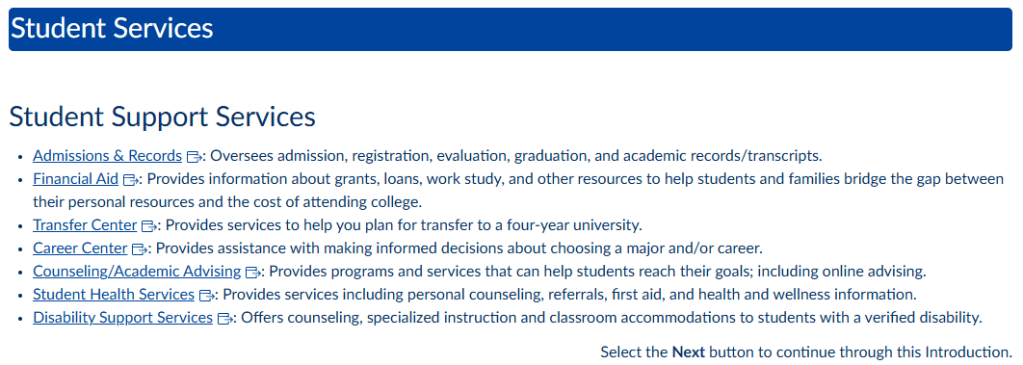
I have included two Student Support Services pages in the Introduction Module in Lib100. These pages are frontloaded in the Introduction Module to make it easy for students to see the types of support FC offers. See the screenshots below.

GenAI Policy Use in LIB100 Page
To comply with the syllabus requirement to provide a course GenAI policy, a page was created that clearly outlines the prohibition of GenAI in the LIB100 and the rationale behind the decision. This page appears on two separate pages within the course: as part of the syllabus and in Module 1. The text of the policy reads as follows:
LIB100 is focused on developing core competencies in research, evaluation, and citation. It will ask you to employ critical thinking skills to complete a series of scaffolded assignments to create a base knowledge of competencies that you will use throughout your educational journey. Some of the essential human skills you will develop are critical thinking, problem-solving, creativity, and effective communication. In addition, the proficiencies you master will help you become a better-informed user of information outside of the classroom. Since these core competencies are so important, it is essential that you develop them without the use of outside sources such as GenAI tools.
You must complete all quizzes, discussions, and assignments without GenAI. If you do need help, please reach out to your instructor.
Use of any GenAI tool is prohibited in LIB100 and considered a violation of the FC academic integrity policy. Some examples of GenAI tools are Copilot, ChatGPT, Claude, and more.
New Videos for Modules 1, 5, and 8
To provide current videos to use as discussion starts, the following TED Talks have been replaced the videos used in Modules 1, 5, and 8. Care has been taken to include diverse voices to provide students with gender and ethnic representation. When replacing springboard videos, a new Canvas page is created with new prompts and new rubrics. All rubrics are module specific and not generic. Please review the course to view the revised prompts and rubrics.
Module 1: AI Is Dangerous, but not for the Reasons You Think narrated by Sasha Luccioni. This TED Talk supports the idea of ethics. According to the site, “AI ethics researcher Sasha Luccioni thinks we need to focus on the technology’s current negative impacts, like emitting carbon, infringing copyrights and spreading biased information. She offers practical solutions to regulate our AI-filled future — so it’s inclusive and transparent.”
Module 5: 3 Ways to Spot a Bad Statistic narrated by Mona Chalabi. This TED Talk supports the idea of evaluation as part of the research process. According to the site, “Sometimes it’s hard to know what statistics are worthy of trust. But we shouldn’t count out stats altogether … instead, we should learn to look behind them. In this delightful, hilarious talk, data journalist Mona Chalabi shares handy tips to help question, interpret and truly understand what the numbers are saying.”
Module 8: A Surprisingly Effective Way to Fight Misinformation narrated by Dave Jorgensen. This TED talk supports the need for skepticism when searching the internet. According to the site, “What if the best defense against misinformation isn’t panic, but a punchline? Journalist and comedian Dave Jorgenson explores how misinformation has proliferated throughout history — from the age of Plato to the era of viral TikToks. With his own short, absurdist sketches that explain the news, he shows how humor can cut through fear, spark curiosity and explore nuanced truth.”
Two New Formative Assignments Added to Canvas Orientation Module
Based on past experience, it appeared that students needed more direction with how to navigate Canvas, especially in the areas of knowing when work is due and knowing when assignments are graded. To close these gaps, 2 low stakes assignments were added to the Canvas Orientation Module: Set Notifications Check and Keeping Track of Due Dates.
The Set Notifications Check is worth 3 points and asks students to access their notifications and change the Announcements, Grading, and Submission Comments notification to immediate. Students upload a screenshot of the Notifications page to earn credit.
The Keeping Track of Due Dates assignment is worth 1 point. Students upload a screenshot of either the Canvas Calendar or the Course Summary page to earn credit.
Including these two low stakes, formative assignments has reduced student confusion and given them tools that they can use across their Canvas courses.
GenAI Basics Workshop Added to Module 1
The GenAI Basics Workshop was added as an assignment to Module 1. The description of this module is: “In this module, you will look at using sources ethically and avoiding bias. You will examine the many types of plagiarism and learn how to avoid falling into any traps. In research, bias can lead you in the wrong direction, so knowing how to recognize it will make you a more balanced researcher. As you move forward on your educational journey, the stakes get higher regarding the use of others’ intellectual property. Understanding the ethical aspects of using sources will help you in college and in life.”
Transition from Hyperlinks to OER Materials to Canvas Pages Using the Universal Access Bot
The Flex Day session “Universal Access Bot: Using AI to Improve Canvas Accessibility and Support ADA Title II” was eye-opening. The session introduced the Universal Access Bot as a tool to create ADA compliant HTML-based Canvas pages to replace files, PDFs, and OER materials. This is a gamechanger. To support inclusive learning, transforming hyperlinks to Canvas pages allows student to use the Immersive Reader feature, which reads Canvas pages aloud to users. Also, using Canvas pages reduces the cognitive load since the readings are accessed within the course and not on outside sites. This conversion is a huge undertaking, but it will be well worth the time and effort. Each conversion requires several steps. Here is a brief overview of the process.
- Covert original reading into a PDF
- Save PDF
- Upload PDF to Universal Access bot
- Assign parameters to HTML conversion such as create HTML, maintain original wording
- Review results by copying HTML code and pasting into a Canvas page
- Read Universal Access Bot suggestions such as add expanders, divide into separate pages, etc
- Rerun PDF through Universal Access Bot with additional parameters
- Copy HTML code and paste in Canvas
- Review Canvas page for accessibility especially alt tags for images
- Make changes as needed
- Save Canvas page
- Import page in LIB100
Thus far, the following OER readings have been converted.
Module 1: The Age of Algorithms, Chapter 2 in Introduction to College Research
Module 2: Types of Information Sources, Chapter 5 in Introduction to College Research, How to Think about Research in Web Literacy for Student Fact-Checkers
Module 3: Chapter 1.1 Understanding Your Information Need in The Information Literacy User’s Guide: An Open, Online Textbook, Chapter 7.2 Keywords in Introduction to College Research, Chapter 7.4 Brainstorming Related Terms in Introduction to College Research, Chapter 6.2 Background Reading in Introduction to College Research, Chapter 4.3 Using Wikipedia Effectively in Introduction to College Research, Chapter 7.1 Research Questions in Introduction to College Research, Chapter 7.4 Creating a Search Statement in Introduction to College Research
Module 4: Chapter 6.1 Choosing a Topic from Introduction to College Research, Chapter 7.3 Avoiding Confirmation Bias from Introduction to College Research
The conversion will continue until all course reading from OER is accessed through Canvas pages.
All Course Videos Converted to Canvas Studio
All course videos have been converted to Canvas Studio. This conversion removes the ads usually frontloaded on YouTube content.
Previous Canvas Revisions
POCR Review June 2023
One of my goals since joining the library team has been to build the LIB100 course and increase student enrollment. I have been teaching the course online since 2018 and have gathered materials to address the Diversity, Equity, and Inclusion (DEI) Initiative. It is my hope that students who take LIB100 feel seen and represented. To that end, I have used Canvas to create a course that follows the OEI CVC Rubric with an eye to DEI. The rubric addresses four areas: Content Presentation, Interaction, Assessment, and Accessibility. The course was evaluated as part of the Peer Online Course Review (POCR) pilot program initiated by the Distance Education Advisory Committee in June 2023. Here is an overview of the review.
Content Presentation:
The 14 elements for quality course design in this section address how content is organized and accessed in the course management system. Key elements include course navigation, learning objectives, and access to student support information.
The course received ratings of aligned or exemplary in each element and required no further revision.
Interaction:
The six elements in this section address instructor-initiated and student-initiated communication. Key elements of quality course design covered in this section include regular effective contact, both between and among instructors and students.
The course received ratings of aligned or exemplary in each element and required no further revision.
Assessment:
The eight elements in this section address the variety and effectiveness of assessments within the course. Key elements include the alignment of objectives and assessments, the clarity of instructions for completing activities, and evidence of timely and regular feedback.
The course received ratings of aligned or exemplary in each element and required no further revision.
Accessibility:
The 16 elements in this section are reviewed to determine if a student using assistive technologies will be able to access the instructor’s course content as required by Section 508 of the Rehabilitation Act of 1973 (also known as “508 Compliance”). The accessibility elements in Section D focus on instructor-generated content that is primarily under the control of faculty when developing a course. Since Section D addresses elements that are required to be present, the elements in this section, when applicable, are only marked as Incomplete or Aligned.
The course received ratings of aligned in each element and required no further revision.

